Microsoft Defender for Cloud Apps (MDCA) Integration with Microsoft Defender for Endpoint
Implemented Microsoft Defender for Cloud Apps integrated with Microsoft Defender for Endpoint to enable Cloud Discovery, Microsoft 365 App Connector, Governance Log validation, OAuth application monitoring, and SaaS security governance following Zero Trust principles.
Project Overview
Microsoft Defender for Cloud Apps (MDCA) is Microsoft's Cloud Access Security Broker (CASB) that provides visibility, governance and protection for cloud applications.
Instead of relying on traditional proxy servers or firewall log collectors, this implementation leverages the Microsoft Defender for Endpoint sensor already deployed on managed devices to discover cloud applications automatically.
Cloud application telemetry, Microsoft 365 activity, OAuth permissions and governance events are centralized within Microsoft Defender for Cloud Apps to improve Shadow IT visibility and SaaS governance.
Business Problem
Shadow IT
Employees frequently access unauthorized SaaS applications without IT approval, creating security and compliance risks.
OAuth Consent Attacks
Malicious third-party applications can obtain long-term access to Microsoft 365 data through OAuth permissions.
Limited Cloud Visibility
Traditional endpoint security solutions cannot identify which cloud applications users access daily.
Compliance Challenges
Organizations require centralized governance for SaaS applications to meet ISO 27001 and Microsoft Zero Trust requirements.
Microsoft Technologies Used
Implementation Steps
Phase 1 — Enable MDCA Integration
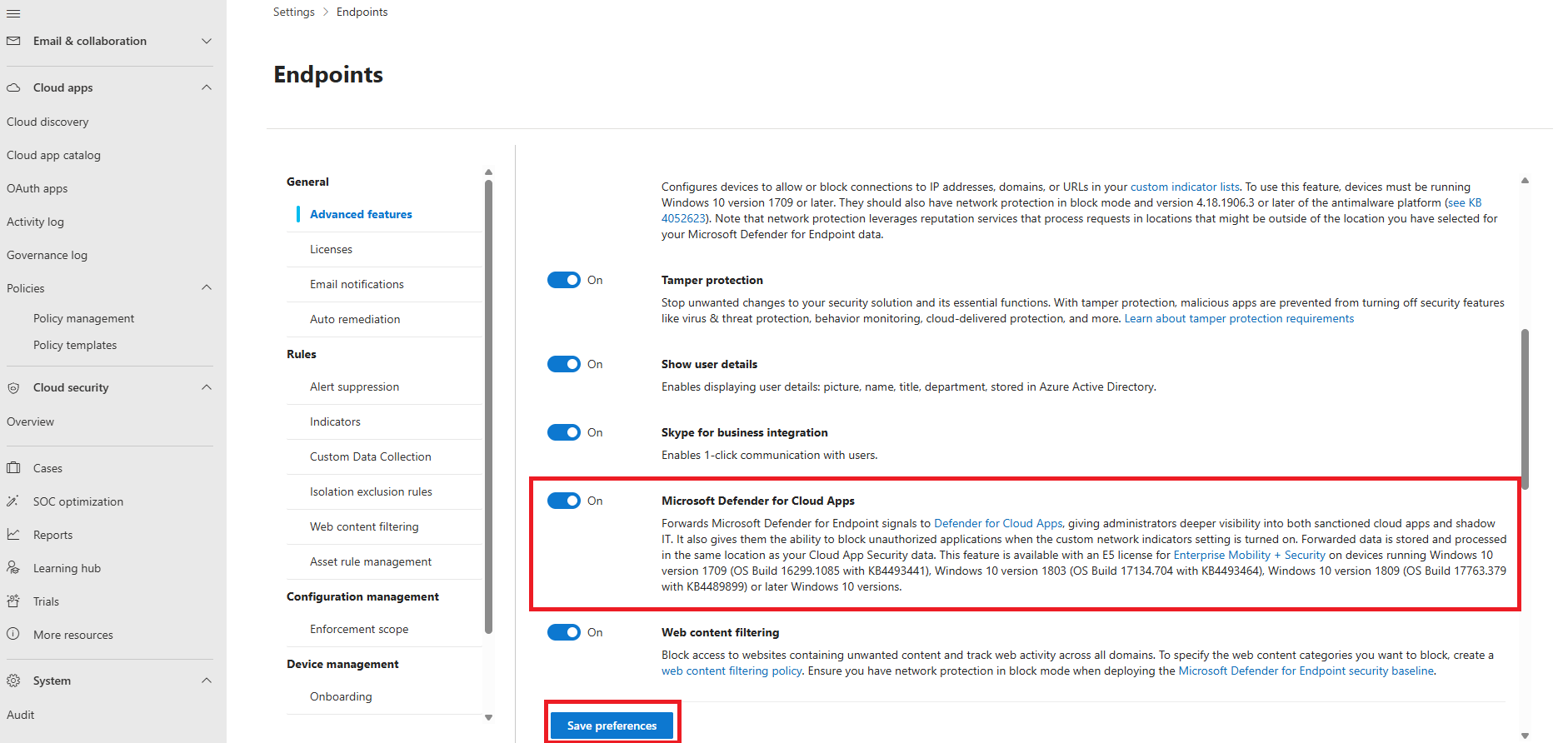
Enabled Microsoft Defender for Cloud Apps integration within Microsoft Defender for Endpoint Advanced Features. This allows endpoint cloud telemetry to flow directly into Cloud Discovery.
Phase 2 — Microsoft 365 App Connector
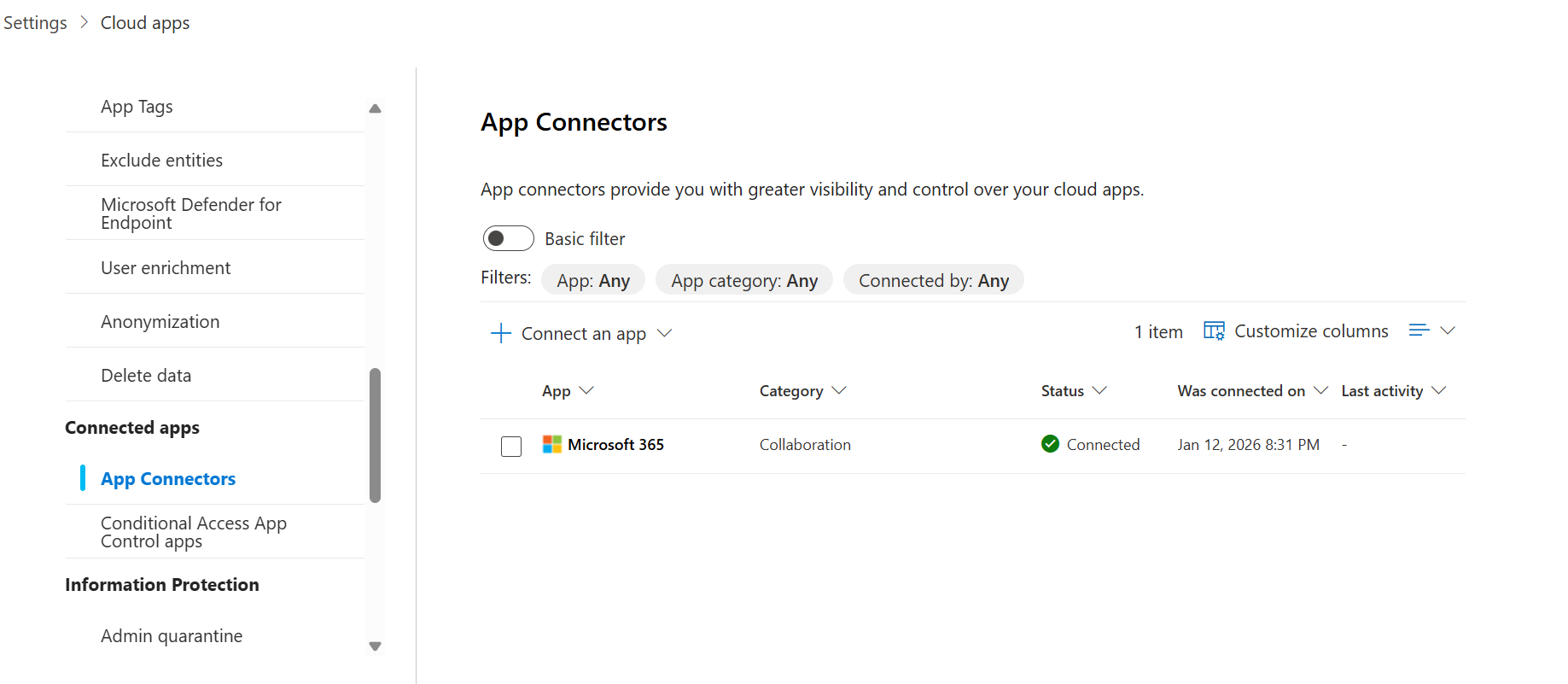
Connected Microsoft 365 using the native App Connector to collect Exchange Online, SharePoint, Teams and OneDrive activity directly through Microsoft Graph APIs.
Implementation Continued
Phase 3 — Governance Log Validation
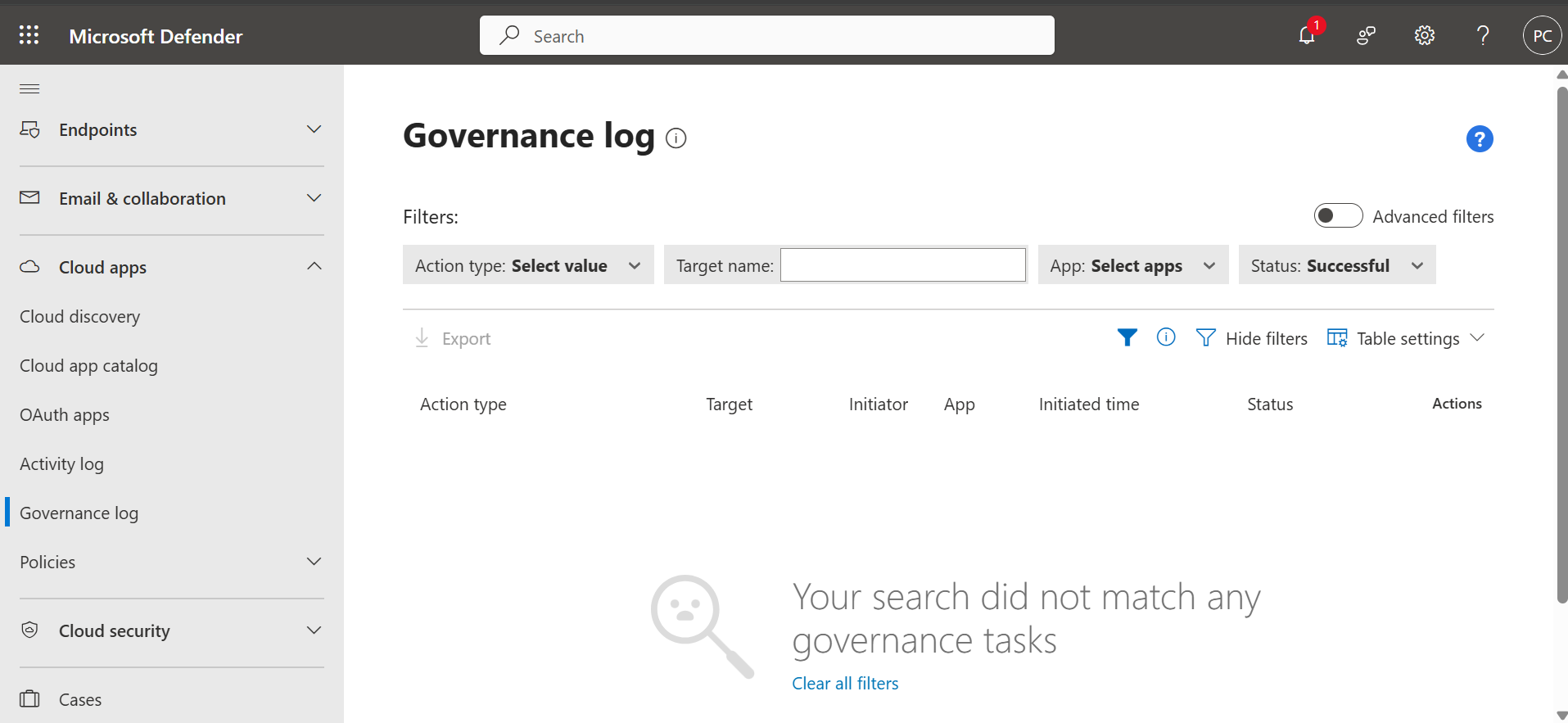
After establishing the Microsoft 365 App Connector, the Governance Log was reviewed to verify successful synchronization between Microsoft Defender for Cloud Apps and Microsoft 365 services. The Governance Log provides a complete audit trail of policy actions, connector synchronization events, and governance activities, ensuring that cloud application monitoring is functioning correctly.
Phase 4 — OAuth Application Monitoring
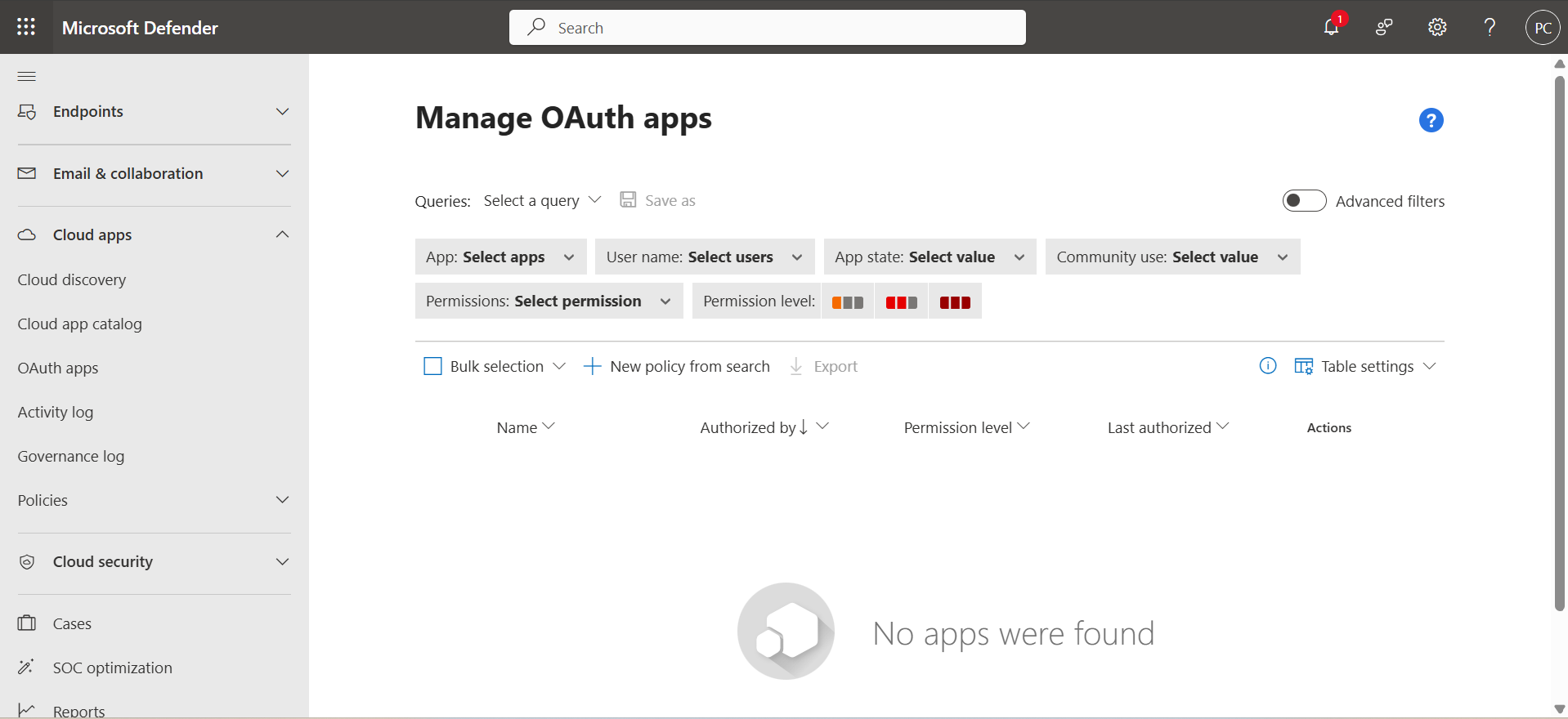
Reviewed OAuth applications that had been granted permissions to Microsoft 365 resources. The implementation validates publisher verification, permission scope, community usage, and consent grants to identify risky third-party applications. OAuth monitoring is one of the most valuable Microsoft Defender for Cloud Apps capabilities because compromised OAuth applications can retain access even after passwords are changed.
Implementation Summary
| Activity | Status |
|---|---|
| Enabled MDCA Integration | ✔ Completed |
| Configured Microsoft 365 App Connector | ✔ Completed |
| Validated Governance Log | ✔ Completed |
| Reviewed OAuth Applications | ✔ Completed |
| Verified Cloud Discovery | ✔ Completed |
| Validated Microsoft Graph Connectivity | ✔ Completed |
Business Benefits
Cloud Discovery
Automatically discovers cloud applications used across managed devices without requiring proxy servers or network appliances.
Shadow IT Visibility
Provides centralized visibility into unsanctioned SaaS applications accessed by employees.
OAuth Governance
Identifies risky OAuth applications and monitors consent grants to reduce cloud identity attack surface.
Zero Trust
Supports Microsoft's Verify Explicitly principle by continuously monitoring cloud application activity.
Security Controls Implemented
| Security Control | Status |
|---|---|
| Microsoft Defender for Cloud Apps Integration | Enabled |
| Cloud Discovery | Configured |
| Microsoft 365 App Connector | Connected |
| Governance Log Monitoring | Validated |
| OAuth Application Inventory | Reviewed |
| Microsoft Graph Integration | Verified |
Skills Demonstrated
Lessons Learned
- Microsoft Defender for Cloud Apps provides cloud visibility without deploying additional agents because it integrates directly with Microsoft Defender for Endpoint.
- Connecting Microsoft 365 through the App Connector enables deep inspection of user activities, files, sharing events, and application behavior.
- OAuth applications should be reviewed regularly because malicious applications can retain delegated permissions even after password resets.
- Governance Logs provide valuable audit evidence during security investigations and compliance reviews.
- MDCA complements Defender for Endpoint by extending Zero Trust principles beyond endpoints into SaaS applications and cloud services.
- Cloud App Security is most effective when combined with Microsoft Entra ID Conditional Access, Microsoft Defender XDR, and Microsoft Sentinel.
Future Improvements
Session Policies
Deploy Conditional Access App Control to monitor and restrict risky browser sessions in real time.
Custom Policies
Create anomaly detection policies for impossible travel, mass downloads, ransomware behavior, and suspicious sign-ins.
Microsoft Sentinel Integration
Forward MDCA alerts into Microsoft Sentinel for centralized incident correlation and automated investigation.
OAuth Governance
Implement automatic approval workflows and periodic reviews for enterprise OAuth applications.
PowerShell Automation
| Script | Purpose |
|---|---|
| Connect-MDCA.ps1 | Connects to Microsoft Defender for Cloud Apps using Microsoft Graph. |
| Get-OAuthApps.ps1 | Exports OAuth applications and delegated permissions. |
| Get-CloudDiscovery.ps1 | Retrieves discovered cloud applications. |
| Export-GovernanceLogs.ps1 | Exports Governance Log activities for auditing. |
Project Outcomes
Cloud Visibility
Established centralized monitoring of Microsoft 365 cloud applications and user activities.
Shadow IT Detection
Improved visibility into cloud application usage and unauthorized SaaS services.
OAuth Risk Reduction
Validated application permissions and reduced risks associated with third-party integrations.
Zero Trust Architecture
Extended Zero Trust principles from endpoint protection to cloud application governance.
Project Repository
View the complete documentation, screenshots, architecture diagrams, PowerShell automation scripts, and implementation guides on GitHub.
View Project on GitHub →