 class="gi">
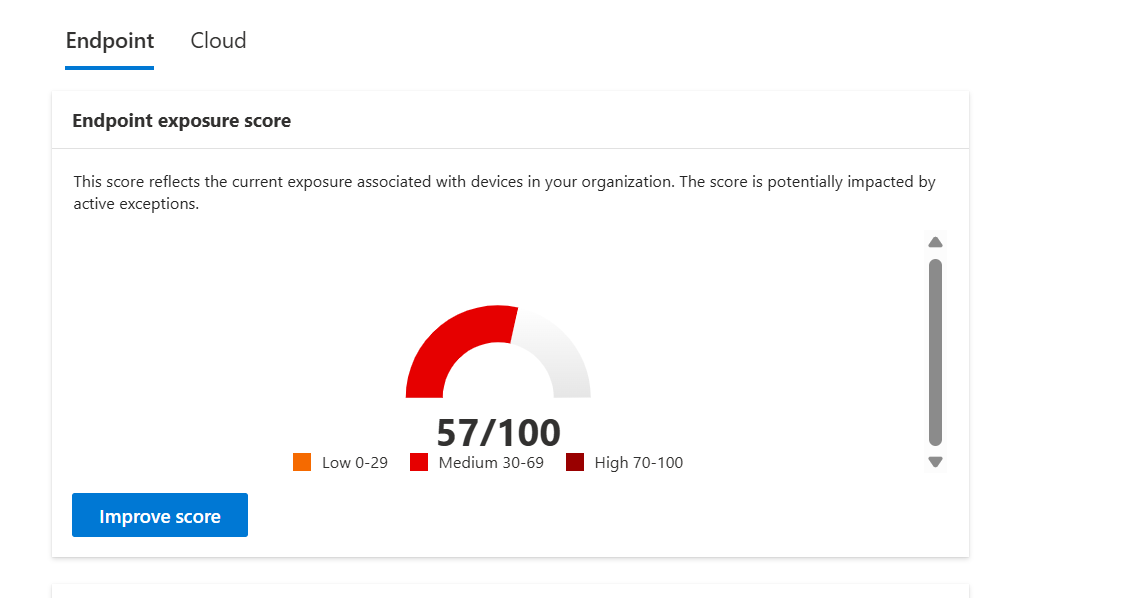
Threat & Vulnerability Dashboard
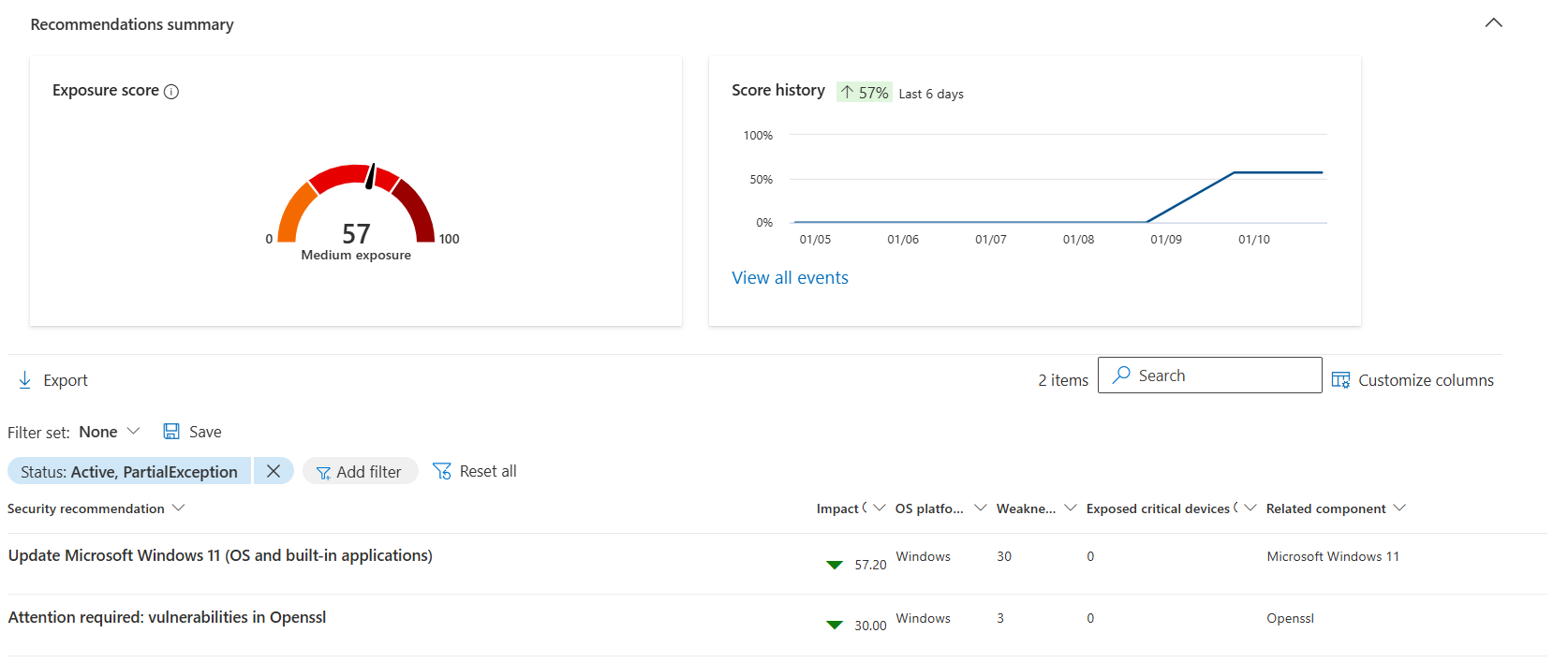
Microsoft Defender TVM dashboard displaying overall device exposure score,
security posture, and remediation recommendations.
Implementing continuous risk-based vulnerability management using Microsoft Defender for Endpoint, Threat & Vulnerability Management (TVM), Exposure Score, Attack Surface Reduction (ASR) Rules, Potentially Unwanted Application (PUA) Protection, Microsoft Intune Endpoint Security, and PowerShell automation.
This project demonstrates the implementation of a continuous Threat & Vulnerability Management (TVM) program using Microsoft Defender for Endpoint Plan 2.
Unlike traditional vulnerability scanners that perform scheduled assessments, Microsoft Defender continuously collects telemetry from onboarded devices and evaluates security posture in real time.
Using Microsoft's Exposure Score engine, vulnerabilities are prioritized according to exploitability, business impact, security recommendations, and attack surface exposure rather than relying solely on CVSS scores.
The project also demonstrates the complete remediation lifecycle including Windows patch management, Attack Surface Reduction (ASR) rule deployment, Potentially Unwanted Application (PUA) protection, risk exception management, and ongoing monitoring.
Modern organisations receive hundreds of new vulnerability notifications every week. Traditional vulnerability scanners only perform periodic assessments and often overwhelm security teams with large lists of findings that are difficult to prioritise.
Without continuous monitoring, security teams cannot determine which vulnerabilities represent the highest business risk, resulting in delayed remediation, patch fatigue, and increased exposure to cyber attacks.
This project demonstrates how Microsoft Defender Threat & Vulnerability Management continuously monitors device security posture, prioritises remediation using Exposure Score, and provides actionable recommendations for reducing enterprise attack surface.
Continuously discover vulnerabilities across Windows endpoints using Microsoft Defender TVM.
Prioritise remediation using Microsoft's risk-based Exposure Score model.
Deploy ASR Rules to block common attack techniques before exploitation.
Reduce enterprise attack surface using Microsoft Intune Endpoint Security policies.
| Component | Configuration |
|---|---|
| Tenant | Patchthecloud.onmicrosoft.com |
| Platform | Microsoft Defender for Endpoint Plan 2 |
| Managed Device | PTC_01 (Windows 11 23H2) |
| Endpoint Management | Microsoft Intune |
| Security Portal | Microsoft Defender XDR |
| Project Date | January 2026 |
Microsoft Defender for Endpoint continuously monitors every onboarded endpoint, collects security telemetry, identifies vulnerabilities, calculates Exposure Score, and recommends prioritized remediation actions. Microsoft Intune is used to deploy endpoint hardening controls such as Attack Surface Reduction (ASR) Rules and Microsoft Defender Antivirus policies.
Windows Endpoint
        │
        ▼
Microsoft Defender Sensor
        │
        ▼
Threat & Vulnerability Management
        │
        ▼
Exposure Score Calculation
        │
        ▼
Security Recommendations
        │
        ▼
Windows Update / ASR / PUA
        │
        ▼
Reduced Attack Surface
Medium Risk
Across Windows Endpoint
None Detected
Requires Immediate Action
class="gi">
| Recommendation | Impact Score |
|---|---|
| Update Microsoft Windows 11 | 57.29 |
| Review OpenSSL Vulnerabilities | 30.00 |
| Enable PUA Protection | 3.00 |
| Deploy ASR Rules | 3.90 |
 class="gi">
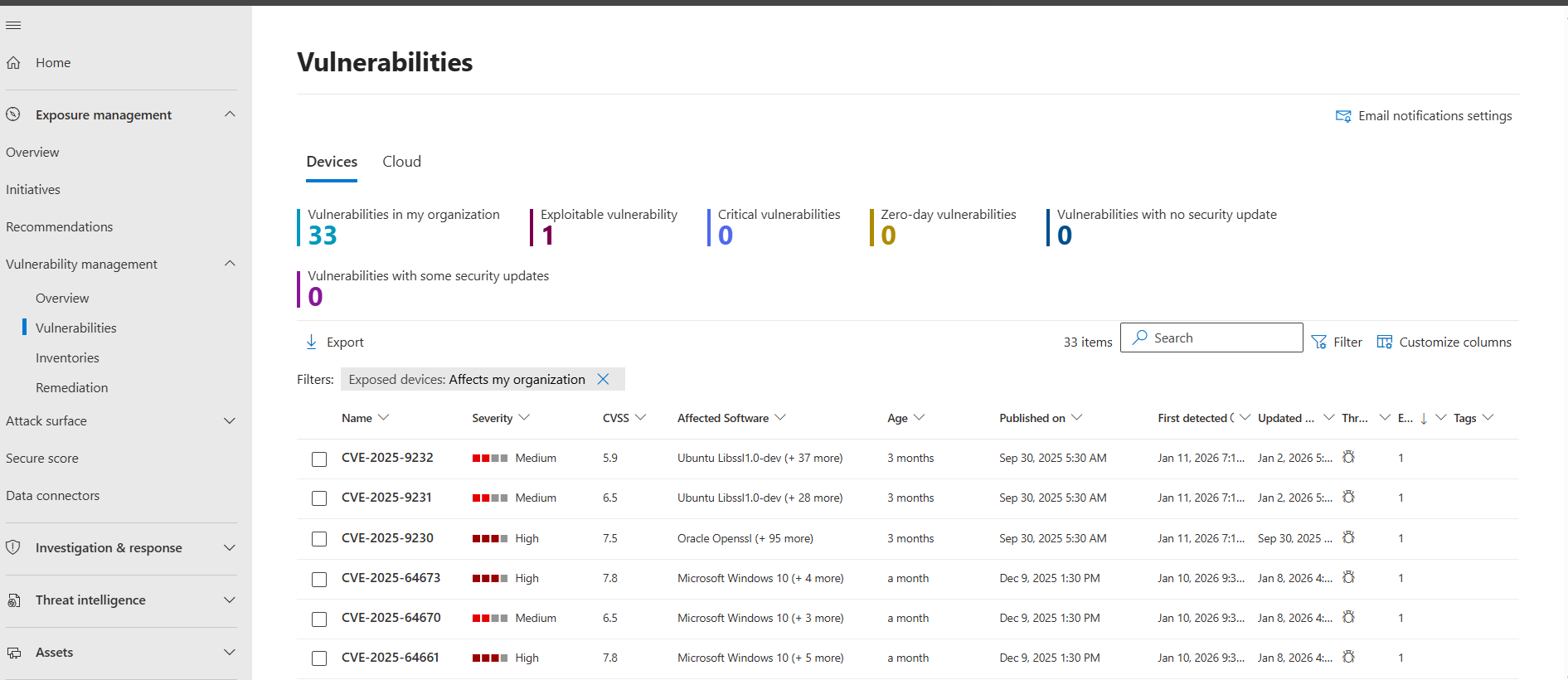
| CVE | Severity | CVSS | Software |
|---|---|---|---|
| CVE-2025-64673 | High | 7.8 | Windows 11 |
| CVE-2025-64661 | Medium | 7.8 | Windows 11 |
| CVE-2025-9230 | High | 7.5 | OpenSSL |
| CVE-2025-64670 | Medium | 6.5 | Windows |
| CVE-2025-9231 | Medium | 6.5 | OpenSSL |
| CVE-2025-9232 | Medium | 5.9 | OpenSSL |
 class="gi">
Applied Windows Update to remediate the highest impact recommendation, removing multiple Windows vulnerabilities.
Accepted vendor-managed residual risk for OpenSSL vulnerabilities embedded within Microsoft OneDrive.
Configured ASR Rule: Block executable content from email client and webmail.
Enabled Microsoft Defender Antivirus Potentially Unwanted Application Protection in Block mode.
Microsoft Defender Antivirus was configured through Microsoft Intune Endpoint Security to block Potentially Unwanted Applications (PUAs). This helps prevent adware, bundled software, and unwanted applications from being installed on managed endpoints.

Following Windows Update deployment, Attack Surface Reduction policy implementation, and PUA Protection, Microsoft Defender TVM generated a new set of recommendations representing the remaining security posture.

Attack Surface Reduction Rules were deployed using Microsoft Intune Endpoint Security to prevent executable content from email clients and webmail, significantly reducing malware delivery risks.

| Security Control | Implementation | Zero Trust Principle |
|---|---|---|
| Threat & Vulnerability Management | Microsoft Defender for Endpoint | Verify Explicitly |
| Exposure Score | Continuous Risk Assessment | Assume Breach |
| Windows Update | OS Vulnerability Remediation | Least Privilege |
| Attack Surface Reduction Rules | Microsoft Intune Endpoint Security | Assume Breach |
| PUA Protection | Microsoft Defender Antivirus | Verify Explicitly |
| Vendor Risk Exception | OpenSSL Exception Register | Continuous Monitoring |
| Script | Purpose |
|---|---|
| Get-TVMVulnerabilityReport.ps1 | Export Defender TVM vulnerabilities using Microsoft Graph. |
| Get-ExposureScoreReport.ps1 | Generate Exposure Score reports. |
| New-ASRPolicy.ps1 | Create Attack Surface Reduction policies. |
Enabled real-time Threat & Vulnerability Management across managed Windows devices.
Remediated the highest-impact Windows vulnerabilities using Microsoft's recommendations.
Reduced attack surface using Attack Surface Reduction Rules and PUA Protection.
Established continuous visibility into endpoint vulnerabilities and remediation status.
| Issue | Resolution |
|---|---|
| Device not visible in TVM | Verify Defender for Endpoint onboarding status. |
| Exposure Score not updating | Allow Defender telemetry to synchronize (up to 24 hours). |
| OpenSSL vulnerabilities remain | Vendor-managed component. Document and monitor until vendor update is released. |
| ASR rule blocks business application | Create a scoped exclusion for the affected application. |
| PUA Protection blocks approved software | Review the software and configure appropriate Defender exclusions if required. |
The complete documentation, screenshots, implementation guides, PowerShell scripts, architecture diagrams, and project artifacts are available on GitHub.
Continue to the next project in the Microsoft 365 Security Portfolio.